The extension system
Everything beyond the framework core is an extension — the Page Builder, Shortcodes, Forms,
Portfolio, Breadcrumbs, and so on. This page explains how extensions are discovered, how the
requirement model orders their activation, what files get included (and in what order), and how a
theme overrides extension code. The component that does all this is _FW_Component_Extensions
(framework/core/components/extensions.php).
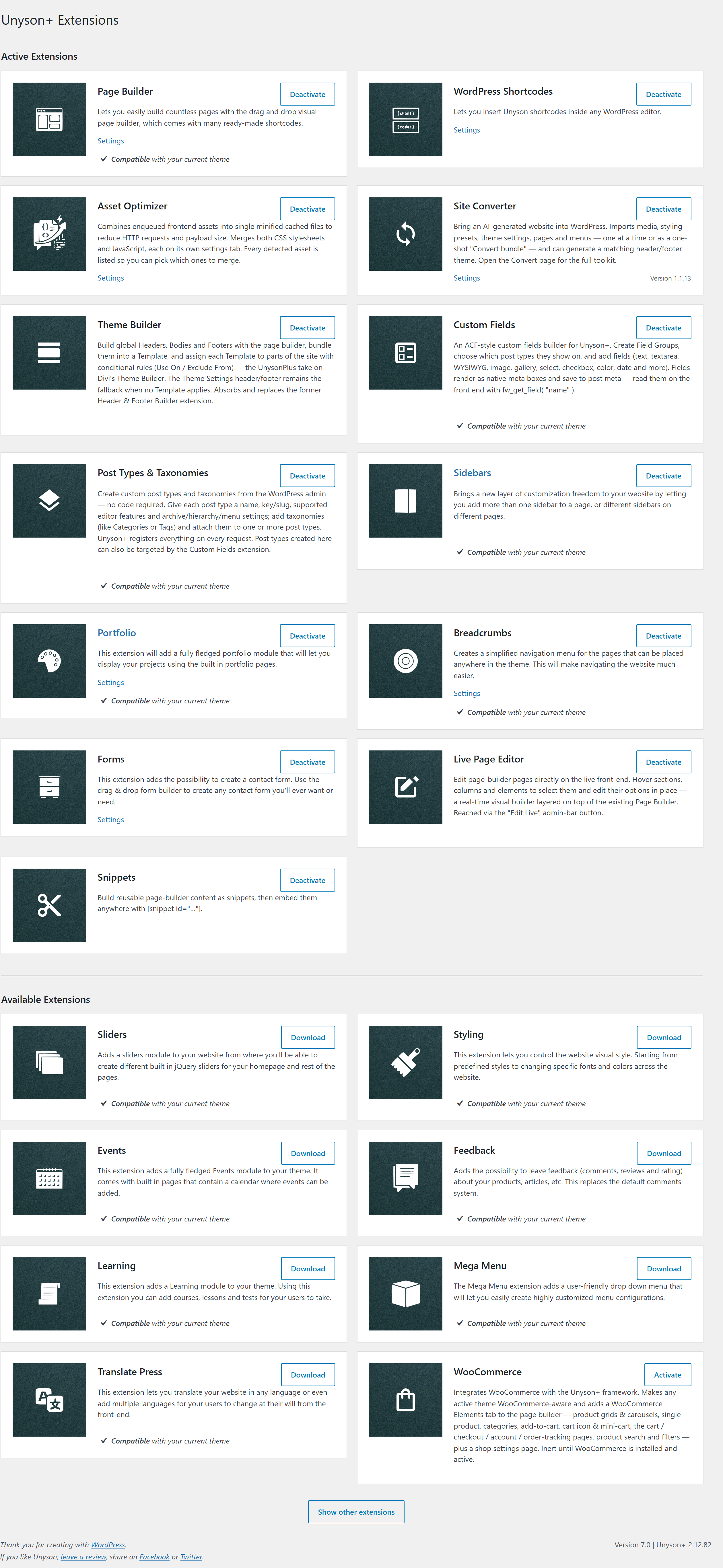
The Unyson+ → Extensions screen is the user-facing front of this system: active extensions sit at the top, available ones can be enabled with one click, and each card shows its requirements.
What an extension is
An extension is a directory containing a manifest.php. The directory name is the extension's
identifier (portfolio, page-builder, …). Optionally it has:
class-fw-extension-<name>.phpdefiningFW_Extension_<Name>(else a default class is used);helpers.php,hooks.php,posts.php,static.php(auto-included at set lifecycle points);- an
includes/directory (every.phpauto-included on activation); - a nested
extensions/directory (sub-extensions, discovered recursively).
Three locations
Extensions are not read from one folder. The framework merges three locations, each able to add new extensions or override files of an extension defined in an earlier location:
1. framework   → unysonplus/framework/extensions/
2. parent theme → <parent>/framework-customizations/extensions/
3. child theme  → <child>/framework-customizations/extensions/   (if a child theme is active)
get_locations() builds this list (cached), and a fw_extensions_locations filter lets a plugin
register additional locations. When the framework includes an extension file, it walks all of that
extension's locations so a theme can override or supplement framework code:
- Default include order is framework → parent → child (later wins).
- Some includes use theme-first (
child → parent → framework) and stop at the first found — e.g.static.php(so a theme's asset enqueue replaces the framework's).
Drop a file at <child-theme>/framework-customizations/extensions/breadcrumbs/views/view.php and
it overrides the framework's breadcrumbs view — without touching the plugin. Same mechanism the
parent theme uses.
Discovery
load_all_extensions() walks each location's /extensions directory. For every sub-directory
that contains a manifest.php, the extension is registered into two structures:
$all_extensions— a flatname → { path, uri, parent, depth, … }map of every extension that exists (active or not);$all_extensions_tree— the same set arranged hierarchically (mirroring the nestedextensions/directories).
A directory without a manifest.php is treated as a customization folder for an
already-registered extension, not a new extension. A name collision across different parents is a
fatal error (Extension "x" is already defined …).
Activation & the dependency model
Discovery doesn't activate anything. Activation happens in activate_extensions(), walking the
tree from the root. An extension is activated only when both:
- it is marked active in the DB (the
fw_active_extensionswp_option — what the Unyson+ → Extensions page toggles), and - its manifest requirements are met.
Requirements decide the order
A manifest can require a minimum framework/WordPress/PHP version and other extensions:
$manifest['requirements'] = array(
    'extensions' => array(
        'shortcodes' => array( 'min_version' => '1.5.0' ),
    ),
);
If a required extension isn't active yet, the dependent isn't skipped — it's queued. The
framework records "extension X is required by Y" in $extensions_required_by_extensions, and
when X later activates, it immediately retries everything waiting on it:
activate_extension('shortcodes')
   ├─ include its files, init it, activate its sub-extensions
   └─ for each extension waiting on 'shortcodes':
         if its requirements are now met → activate it too
This is why the active-extensions array is order-sensitive: if A requires B, B is always
activated (and its scripts registered) before A — so wp_enqueue_script('A', …, array('B'))
resolves correctly.
Class resolution
On activation the framework looks for class-fw-extension-<name>.php and instantiates
FW_Extension_<Name>. If that file doesn't exist, it falls back to the parent extension's
*_Default class, or finally FW_Extension_Default. The chosen class must subclass
FW_Extension or it's a fatal error.
The activation lifecycle
When an extension activates, its files are included in this order, then it's initialized:
activate_extension(name)
   1. register it in the active tree
   2. include  /includes/*.php   (all files, all locations)
   3. include  /helpers.php      (all locations)
   4. include  /hooks.php        (all locations)
   5. $instance->_call_init()    ← the extension's own _init()
   6. recurse into its sub-extensions
Two more files are included later, on WordPress hooks rather than at activation:
posts.php— oninit(register post types & taxonomies at the right time).static.php— onwp_enqueue_scripts/admin_enqueue_scripts(theme-first, first-found).
Querying extensions at runtime
fw()->extensions->get('portfolio');   // FW_Extension|null — the active instance, or null
fw()->extensions->get_all();          // all active extensions
fw()->extensions->get_tree();         // active extensions arranged as a directory tree
fw_ext('portfolio');                  // shorthand for fw()->extensions->get('portfolio')
get() returns null for an inactive or non-existent extension, so guard the result before using
it — that's the idiomatic way to make a feature depend on an optional extension being active.