Dynamic Content
Headers, footers, and body templates are global — one design shown across many URLs — so they
need a way to pull in whatever post the request is showing. That's Dynamic Content: a family of
elements (and a set of {{token}} tags) that resolve, at render time, against the current post.
The part editors expose a Dynamic Content tab in the element palette with these elements; they appear only inside the Theme Builder part editors (Header / Body / Footer), because that's the only place a "current post, decided per request" makes sense.
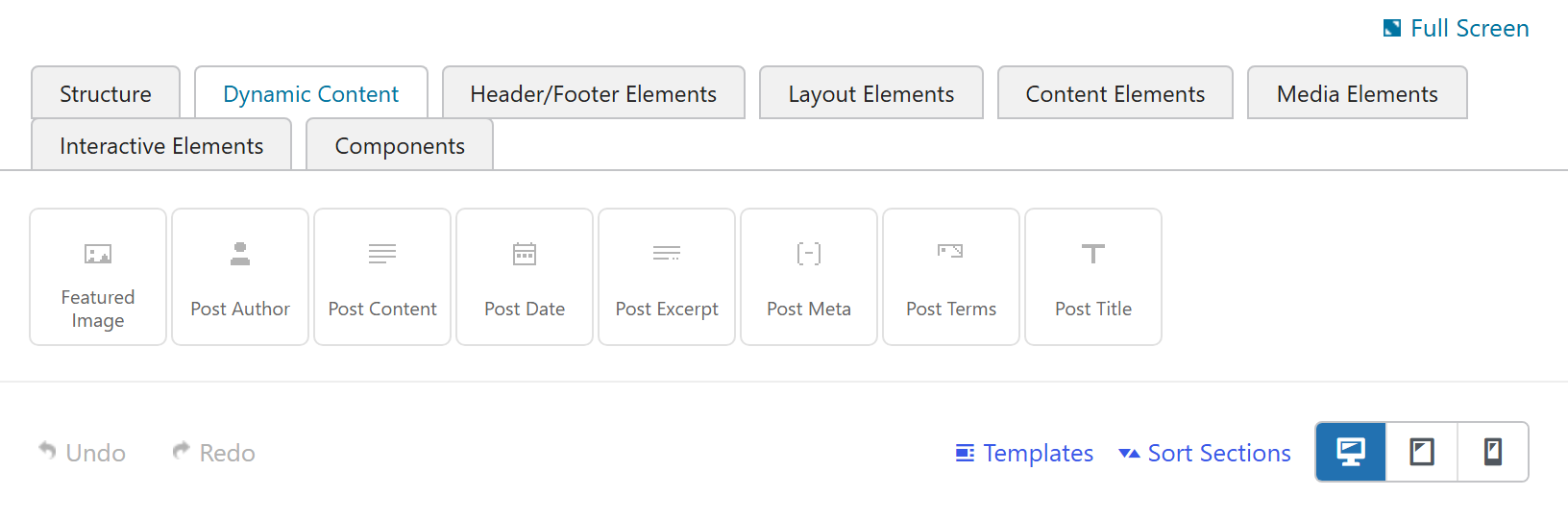
The element family
| Element | Outputs | Key options |
|---|---|---|
| Post Content | The body content of the post/page being viewed (the_content). | Alignment |
| Post Title | The post/page title. | Heading tag (h1–h6), Link to post |
| Post Excerpt | The excerpt (or a trimmed‑content fallback). | Length, "read more" |
| Featured Image | The post's featured image. | Image size, Link to (post / media / none) |
| Post Author | The post author. | Prefix ("By"), Link to author, Show avatar, Avatar size |
| Post Date | The published or modified date. | Date type (published / modified), Date format, Link to post |
| Post Terms | The post's terms in a taxonomy. | Taxonomy (categories / tags / custom), Prefix, Separator, Link terms |
| Post Meta | A custom field value by key. | Meta key, Before / After text |
Each renders a clean, single semantic wrapper (e.g. <div class="post-author">…</div>) and outputs
nothing when its field is empty — so a missing excerpt, author avatar, or meta value simply
leaves no markup. Every element carries the standard Styling (text color / font size / spacing),
Animations, and Advanced (CSS id/class, visibility) tabs.
Because these resolve against the current request's post, a single body template renders correctly for every post it applies to. Use the live preview to check one against a real post before you publish.
Post Content — the keystone
The Post Content element outputs the content of the post or page being viewed — exactly what a
hand‑written WordPress template gets from the_content(). For a page built with the page builder,
that's the page's full builder design.
There's nothing to type into it; you design where it appears (with a Flexbox and the surrounding header/footer) and style it with its own tabs:
- Content → Alignment — horizontal alignment of the content (output as a
text-*class on the wrapper). - Styling — Text Color, Font Size, Margin & Padding.
- Animations / Advanced — the standard element tabs (CSS class/ID, visibility, etc.).
The Post Content pattern
This is the recommended way to give a designed page your global chrome without duplicating the design into a global body:
- Build the page in the page builder as a normal Page.
- Create a Body Template that contains only a Post Content element.
- In a Template, set that body + your header/footer, and Use On the page (or Front page).
At render time the body wraps the page: header → (your page's own content via Post Content) → footer. The design stays in the page; the body is a thin, reusable layout shell. See Body Templates → the Post Content pattern.
A body that contains a Post Content element wraps the queried page (it renders the page's own content inside the template), so it's safe to apply even to a fully built page. A body without Post Content is a full replacement and deliberately never overrides a page you built yourself.
{{token}} tags
Because parts are normal builder content, Dynamic Content tokens also work inside any text field —
a {{post_title}}, {{post_meta key="…"}}, {{author_name}}, {{date}}, etc. resolve against the
post the request is showing. A token can carry a fallback for when the value is empty.
Tokens and elements draw from the same registry, so what you can insert as a {{token}} and what
exists as a dedicated element stay in lockstep.
The Dynamic Content tab (and the structure Flexbox) appear only inside the Theme Builder part
editors. On a normal Page or Post there is no "queried post to bind to" that's different from the post
you're editing, so the framework hides them there to keep the page‑builder palette focused. The
Template form itself also has the dynamic‑content picker turned off on every field — a Template is
global assignment data (a name and where/where‑not rules), not post‑contextual, so {{tokens}} there
would be meaningless.
See also
- Body Templates — where Dynamic Content elements live
- Flexbox — laying the elements out
- Dynamic Content (framework) — the
{{token}}system in full