Addable Option
Create a list of options.
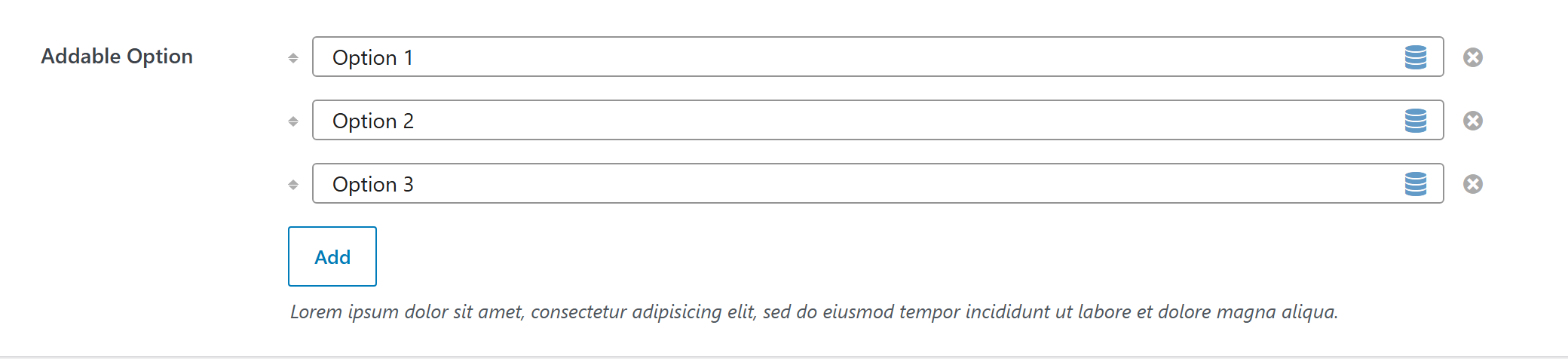
$options = [
	'demo_addable_option' => [
		'label' => __( 'Addable Option', 'unysonplus' ),  // or false to hide the label column
		'type' => 'addable-option',
		'option' => [
			'type' => 'text',
		],
		'value' => [ 'Option 1', 'Option 2', 'Option 3' ],
		'desc' => __( 'Lorem ipsum dolor sit amet, consectetur adipisicing elit, sed do eiusmod tempor incididunt ut labore et dolore magna aliqua.',
			'unysonplus' ),
		'help' => sprintf( "%s \n\n'\"<br/><br/>\n\n <b>%s</b>",
			__( 'Lorem ipsum dolor sit amet, consectetur adipisicing elit, sed do eiusmod tempor incididunt ut labore et dolore magna aliqua.',
				'unysonplus' ),
			__( 'Sed ut perspiciatis, unde omnis iste natus error sit voluptatem accusantium doloremque laudantium',
				'unysonplus' )
		)
		// — Optional attributes you can add —
		// 'attr' => [ 'class' => 'my-class', 'data-foo' => 'bar' ],  // extra HTML attributes
		// 'add-button-text' => __( 'Add', 'unysonplus' ),
		// 'sortable' => false,  // disable drag-to-reorder
		// 'connect_group' => 'my_group',  // cross-list drag-and-drop (see below)
	],
];
Cross-list drag-and-drop — connect_group
Set the same non-empty connect_group on two or more addable-option fields and their rows can
be dragged between them (not just reordered within one list). Empty (the default) keeps each list
self-contained.
// Two lists that share a group id → rows drag across; unrelated lists stay isolated.
$options = [
	'tags_left'  => [ 'type' => 'addable-option', 'label' => __( 'Left', 'unysonplus' ),
		'connect_group' => 'my_tags', 'option' => [ 'type' => 'text' ] ],
	'tags_right' => [ 'type' => 'addable-option', 'label' => __( 'Right', 'unysonplus' ),
		'connect_group' => 'my_tags', 'option' => [ 'type' => 'text' ] ],  // ← same id → interlinks
];
Scope the group id per logical group so unrelated addable-options on the same page don't
interlink. Notes:
- Empty connected lists stay visible as a "Drag an item here" drop target.
- Moves persist automatically.
addable-optionrows are stored under indexed names ([id][n]), and the form saves by input name, so a dragged row is re-keyed to the receiving list on drop — you don't need to do anything; just set the sameconnect_group. - Works best with a leaf inner
option(text, select, …) — the common case.
Custom Events
fw:option-type:addable-option:option:init - New option was added and initialized.
Reading the value
addable-option returns an array — read a field by key (the full shape is in Saved value below).
In a shortcode
The shortcode framework passes the option values into view.php as $atts:
$value = $atts['demo_addable_option'];
foreach ( (array) $value as $row ) {
	// each $row is one added item (an array of its sub-option values)
}
In a page template — a per-page option
Options defined on a post/page (a metabox) are read with fw_get_db_post_option():
$value = fw_get_db_post_option( get_the_ID(), 'demo_addable_option' );
foreach ( (array) $value as $row ) {
	// each $row is one added item (an array of its sub-option values)
}
When the field is one of several inside a box/group, read the whole group once and pick fields by key — the common CPT pattern (e.g. a review or book box):
$book  = fw_get_db_post_option( get_the_ID(), 'book' );
$value = $book['demo_addable_option'];
foreach ( (array) $value as $row ) {
	// each $row is one added item (an array of its sub-option values)
}
In Theme Settings — a global option
Global options are read with fw_get_db_settings_option():
$value = fw_get_db_settings_option( 'demo_addable_option' );
foreach ( (array) $value as $row ) {
	// each $row is one added item (an array of its sub-option values)
}
Saved value
fw_print( fw_get_db_settings_option( 'demo_addable_option' ) ) outputs — the shape of this option type's stored value:
Array
(
    [0] => First item
    [1] => Second item
    [2] => Third item
)