Background Pro
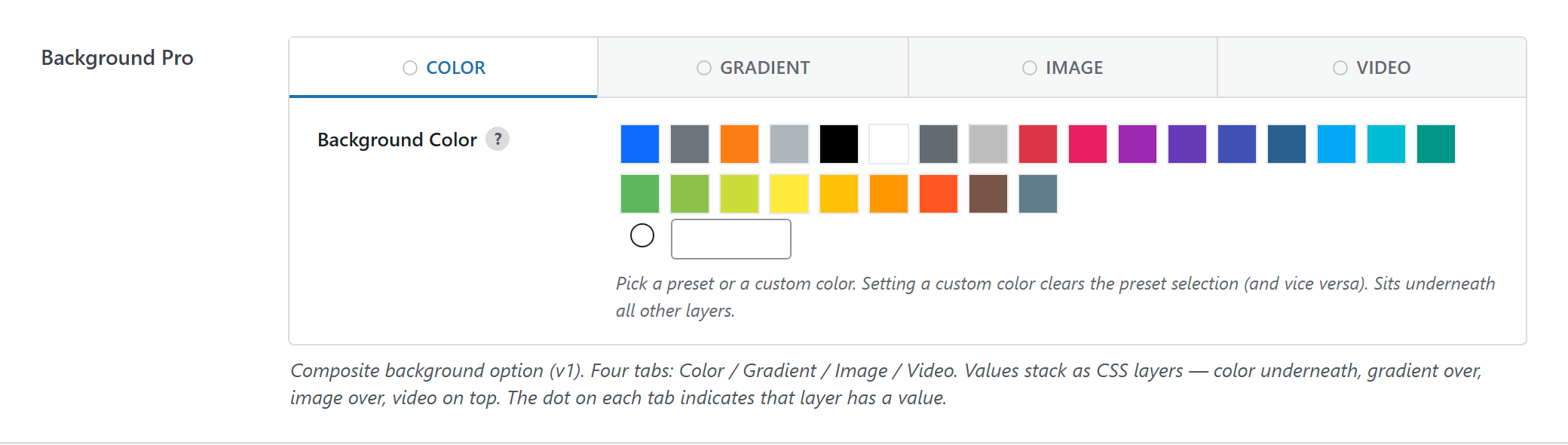
Composite background option with Color / Gradient / Image / Video tabs that stack as CSS layers (color underneath → video on top). The dot on a tab marks a layer that has a value.
$options = [
	'demo_background_pro' => [
		'label' => __( 'Background Pro', 'unysonplus' ),
		'type' => 'background-pro',
		'desc' => __( 'Composite background option (v1). Four tabs: Color / Gradient / Image / Video. Values stack as CSS layers — color underneath, gradient over, image over, video on top. The dot on each tab indicates that layer has a value.', 'unysonplus' ),
		// — Optional attributes you can add —
		// 'value' => [],
		// 'disable' => [],
	],
];
Reading the value
background-pro returns an array — read a field by key (the full shape is in Saved value below).
In a shortcode
The shortcode framework passes the option values into view.php as $atts:
$value = $atts['demo_background_pro'];
echo esc_attr( $value['color'] ); // + gradient / image / video / overlay (see Saved value)
In a page template — a per-page option
Options defined on a post/page (a metabox) are read with fw_get_db_post_option():
$value = fw_get_db_post_option( get_the_ID(), 'demo_background_pro' );
echo esc_attr( $value['color'] ); // + gradient / image / video / overlay (see Saved value)
When the field is one of several inside a box/group, read the whole group once and pick fields by key — the common CPT pattern (e.g. a review or book box):
$book  = fw_get_db_post_option( get_the_ID(), 'book' );
$value = $book['demo_background_pro'];
echo esc_attr( $value['color'] ); // + gradient / image / video / overlay (see Saved value)
In Theme Settings — a global option
Global options are read with fw_get_db_settings_option():
$value = fw_get_db_settings_option( 'demo_background_pro' );
echo esc_attr( $value['color'] ); // + gradient / image / video / overlay (see Saved value)
Saved value
fw_print( fw_get_db_settings_option( 'demo_background_pro' ) ) outputs — the shape of this option type's stored value:
Array
(
    [color] => Array
        (
            [value] => Array
                (
                    [predefined] =>
                    [custom] => #f8f9fa
                )

        )

    [gradient] => Array
        (
            [data] => Array
                (
                    [type] => linear
                    [angle] => 90
                    [stops] => Array
                        (
                        )

                )

        )

    [image] => Array
        (
            [src] => Array
                (
                    [attachment_id] => 123
                    [url] => https://example.com/wp-content/uploads/2026/06/hero.jpg
                )

            [position] => center center
            [size] => Array
                (
                    [selected] => cover
                    [custom] =>
                )

            [repeat] => no-repeat
            [attachment] => scroll
        )

    [video] => Array
        (
            [enabled] => no
        )

    [advanced] => Array
        (
        )

)