Multi
Group any options database values under a single array key. This option has no design, inner options will look the same as other options (it's like the group container).
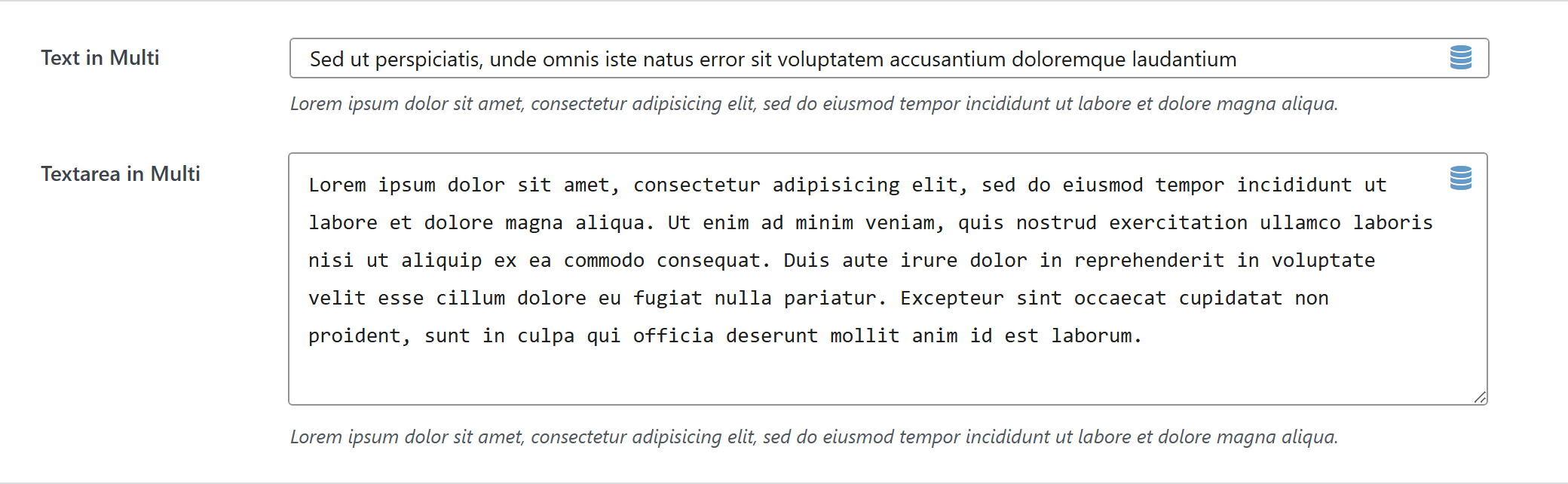
// database value structure

'option_type_multi_id' => array(
    'inner_option_1' => ...
    'inner_option_2' => ...
)
$options = [
	'demo_multi' => [
		'label' => false,  // or false to hide the label column
		'type' => 'multi',
		'value' => [],
		'desc' => false,
		'inner-options' => [
			'demo_text' => [
				'label' => __( 'Text in Multi', 'unysonplus' ),
				'type' => 'text',
				'value' => 'Sed ut perspiciatis, unde omnis iste natus error sit voluptatem accusantium doloremque laudantium',
				'desc' => __( 'Lorem ipsum dolor sit amet, consectetur adipisicing elit, sed do eiusmod tempor incididunt ut labore et dolore magna aliqua.',
					'unysonplus' ),
				'help' => sprintf( "%s \n\n'\"<br/><br/>\n\n <b>%s</b>",
					__( 'Lorem ipsum dolor sit amet, consectetur adipisicing elit, sed do eiusmod tempor incididunt ut labore et dolore magna aliqua.',
						'unysonplus' ),
					__( 'Sed ut perspiciatis, unde omnis iste natus error sit voluptatem accusantium doloremque laudantium',
						'unysonplus' )
				),
			],
			'demo_textarea' => [
				'label' => __( 'Textarea in Multi', 'unysonplus' ),
				'type' => 'textarea',
				'value' => 'Lorem ipsum dolor sit amet, consectetur adipisicing elit, sed do eiusmod tempor incididunt ut labore et dolore magna aliqua. Ut enim ad minim veniam, quis nostrud exercitation ullamco laboris nisi ut aliquip ex ea commodo consequat. Duis aute irure dolor in reprehenderit in voluptate velit esse cillum dolore eu fugiat nulla pariatur. Excepteur sint occaecat cupidatat non proident, sunt in culpa qui officia deserunt mollit anim id est laborum.',
				'desc' => __( 'Lorem ipsum dolor sit amet, consectetur adipisicing elit, sed do eiusmod tempor incididunt ut labore et dolore magna aliqua.',
					'unysonplus' ),
				'help' => sprintf( "%s \n\n'\"<br/><br/>\n\n <b>%s</b>",
					__( 'Lorem ipsum dolor sit amet, consectetur adipisicing elit, sed do eiusmod tempor incididunt ut labore et dolore magna aliqua.',
						'unysonplus' ),
					__( 'Sed ut perspiciatis, unde omnis iste natus error sit voluptatem accusantium doloremque laudantium',
						'unysonplus' )
				),
			],
		],
		// — Optional attributes you can add —
		// 'attr' => [ 'class' => 'my-class', 'data-foo' => 'bar' ],  // extra HTML attributes
	],
];
The parameter that contains options is named inner-options not options otherwise this will be treated as a container option.
Reading the value
multi returns an array — read a field by key (the full shape is in Saved value below).
In a shortcode
The shortcode framework passes the option values into view.php as $atts:
$value = $atts['demo_multi'];
echo esc_html( $value['demo_text'] ); // each key is a nested option id
In a page template — a per-page option
Options defined on a post/page (a metabox) are read with fw_get_db_post_option():
$value = fw_get_db_post_option( get_the_ID(), 'demo_multi' );
echo esc_html( $value['demo_text'] ); // each key is a nested option id
When the field is one of several inside a box/group, read the whole group once and pick fields by key — the common CPT pattern (e.g. a review or book box):
$book  = fw_get_db_post_option( get_the_ID(), 'book' );
$value = $book['demo_multi'];
echo esc_html( $value['demo_text'] ); // each key is a nested option id
In Theme Settings — a global option
Global options are read with fw_get_db_settings_option():
$value = fw_get_db_settings_option( 'demo_multi' );
echo esc_html( $value['demo_text'] ); // each key is a nested option id
Saved value
fw_print( fw_get_db_settings_option( 'demo_multi' ) ) outputs — the shape of this option type's stored value:
Array
(
    [heading] => A heading
    [enabled] => yes
)